I've been using a couple of new software programs to help manage my projects - both my photography projects as well as my personal projects. The two programs are well integrated into Apple's OSX Leopard operating system and allow integration between a number of programs including the Address Book, iCal, iPhoto, iTunes and other Apple System Applications.
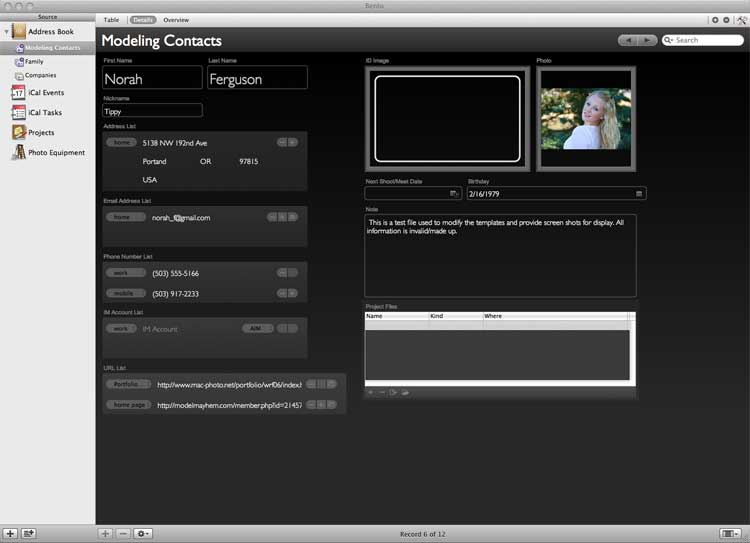
The first program is a simplified data based named Bento. It's published by the same company that makes the well known Mac database Filemaker Pro, an Apple subsidiary company. I've used Filemaker Pro for many years, though to make it work well I've had to purchase or find shareware templates that came close to my needs and then modify them to work for me. Filemaker Pro is the program I use to manage my photography business assets (track equipment, calculate depreciation, record new purchases, etc.). Bento is more user friendly and the interface is designed to not intimidate the casual database user. The program integrates well will Apples Address Book and as you can see from the example above, I'm using it to track the models who have worked with me or who will potentially work with me in the future. While I could do this directly in the address book, Bento gives me a more robust interface and allows me to customize the look of the data, add more media fields as establish a table of links that I can use to manage other related files in the data base. In the example above, I have a link to file where I track a specific photography project. If I use this particular (fictional in this case) model for more than one project, and I have a link on her record page to each of the project tracking sheets that I'm using. These sheets are files from another program that I'll be telling you about in a moment, but first I'd like to tell you a little more about Bento.
First of all, what do I like about Bento:
1. It's simple and intuitive to use. It can create an elegant looking data base using a number of themes and allows you to easily design a custom form.
2. It allows multiple forms for a record and gives you a Table View, an Overview and a Detail View as defaults. Of course, can delete or add views as you desire.
3. The integration with the Address Book and iCal is quite good.
4. The provided templates and themes are useful. The templates provide good starting points for a number of databases you can manage.
What I don't like:
1. Everything (all data) is kept in one data set. Over time this seems like it would create a bloated data base that would slow down and increase the chances of a crash.
2. Once you modify a project file (library) to your liking, you can't save it as a template and use it as a starting point for another library that would use similar fields.
3. You're restricted to using the themes provided and as far as I can tell, you only have limited ability to modify the colors/graphics within the themes.
Bento will probably improve quite a bit as it evolves as this is only the first release. It's not everything I would like it to be, but it's a nice start.

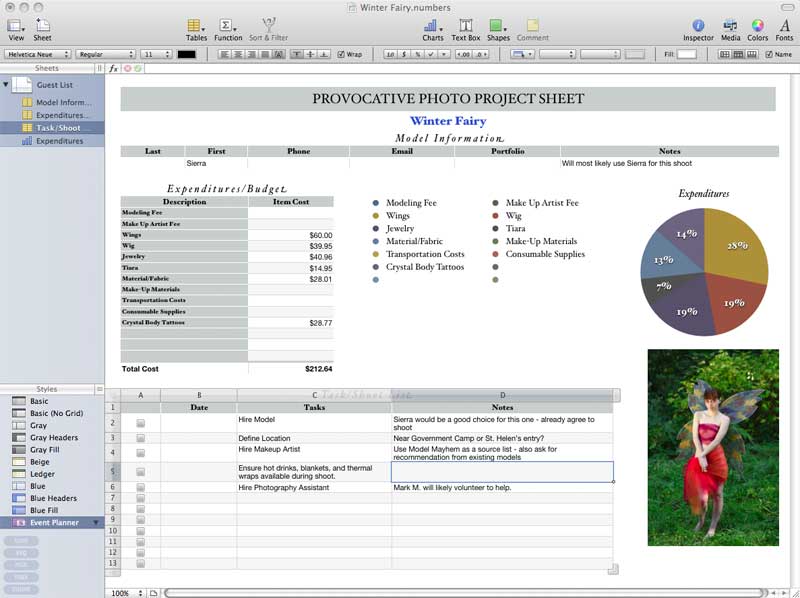
Numbers is the other program that I've been using quite a bit recently. It's part of Apple's iWork suite of programs, Keynote and Pages are the other programs in the suite. Numbers is essentially an intuitive and simple to use spreadsheet program. It's quite versatile, easy to manage, and fun to use. As you can see from the image to the right, I'm using it to track expenditure, contacts, and tasks for my summer photo projects.
It, too, integrates well with Apple's Address Book and iCal programs. For example, I can drag and drop contact data from my Address Book into the table for Model Contact data and the fields will be automatically populated with the information. There is less integration with iCal, or perhaps I just haven't figured it out quite yet.
What I like about numbers:
1. Simple, elegantly intuitive and easy to use. You can easily manage, create and maintain data.
2. You can save any file as a template and be able to use the same form for any number of projects. That's a big advantage over Bento.
3. Good integration with other Apple applications. You can browse media files right within the application itself or you can insert files directly with drag and drop from the Finder application.
What I don't like:
Well, I wish I could open an Address Book Record or create and iCal Event (with reminder) directly within a worksheet. This would be great for tracking key tasks and contacts within the project file. Maybe it can be done and I just haven't figured it out yet, but if so, it's not as intuitive a function as the rest of the program.
Numbers is obviously a more mature program than Bento, but I like the way I'm able to use them together to created a unified system for managing my projects. Now, if I could only find a way to export my Filemaker Pro Database over without having major reformat issues.
 The image to the left was uploaded from Flickr.